
Anthropic's Claude uses 9-layer "burger" for AI context assembly
Serge Bulaev
Anthropic's Claude uses a nine-layer system, called the "context burger," to organize all the information it uses for each call. The layers start with important things like system prompts and environment data, and end with recent tool outputs and summaries, following a strict order. The research suggests that keeping context small and well-chosen may work better than giving the model too much information. When the context gets too large, Claude automatically trims less important data to stay efficient and focused. Engineers are advised to keep instructions clear and organized in the right layers to get the best results.

Anthropic's Claude models use a nine-layer "context burger" for AI context assembly, a structured approach to manage the information provided in each API call. This mental model helps engineers optimize prompts by organizing data into a strict hierarchy, as context is a scarce and critical resource. A recent arXiv paper details these layers, which range from system prompts to tool outputs, ensuring a balance of relevance, safety, and cost.
This layered stack ensures predictable behavior, as outer layers can only refine or veto instructions from inner layers, not overwrite them. This means tuning higher-level instructions like CLAUDE.md files or auto-memory yields consistent results, whereas changing the core system prompt alters the AI's fundamental behavior. Official documentation from Anthropic's cookbook details two memory systems, CLAUDE.md and auto-memory, along with a compaction pipeline that automatically trims conversation history to manage the token budget.
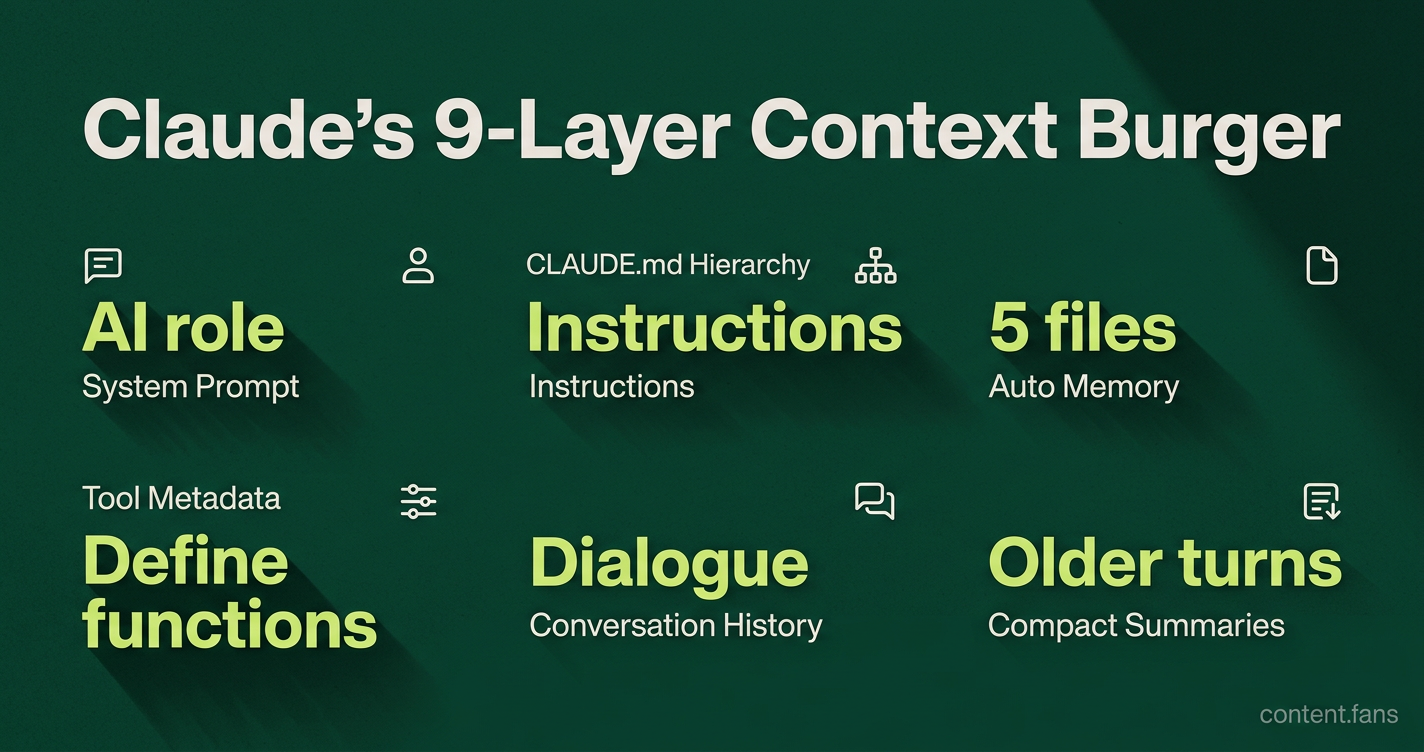
Inside the nine-layer burger
The nine-layer context burger is Anthropic's system for organizing prompt information. It stacks data in a specific order of importance, starting with the core system prompt and environment data, followed by instruction files, memory, tool definitions, conversation history, and tool outputs, ensuring optimal performance and relevance.
- System prompt: Defines the AI's role, tone, and fundamental guardrails.
- Environment metadata: Includes call-time data like the current date or git status.
CLAUDE.mdhierarchy: A stack of managed, user, project, and local instruction files.- Auto memory: Up to five relevant files prefetched automatically.
- Conditional path rules: Directory-specific overrides for specialized tasks.
- Tool metadata: YAML descriptors that define available functions or actions.
- Conversation history: The verbatim user-AI dialogue, preserved until compaction.
- Tool outputs: Results from any executed commands or file reads.
- Compact summaries: AI-generated summaries of older conversation turns to save space.
The first three layers load before user interaction, establishing a stable baseline for the AI. Layers 4-6 are session-specific and adapt to the task, while layers 7-9 represent the most volatile part of the context. As this section grows, it risks exceeding the token limit, triggering a compaction process that prioritizes recent information and key instructions.
Why context pressure matters
Exceeding the context window has significant performance costs. Pushing prompts beyond certain token thresholds can substantially increase cache read costs, as reported by Claude Code Camp. More importantly, performance doesn't always scale with size; a well-curated smaller context can outperform a much larger unfiltered one due to the "lost in the middle" phenomenon. This suggests a strategy of surgical, relevant context is superior to a maximalist approach.
To manage this, Anthropic recommends keeping CLAUDE.md files concise with evergreen rules. Verbose instructions can reduce compliance as important details get lost. The best practice is to place high-level conventions in the project root's CLAUDE.md and use subdirectory files for more specific, granular guidance, which will override broader rules as Claude processes them.
Tuning for predictable behavior
To create predictable and secure behavior, place critical invariants like security policies in the system prompt or managed CLAUDE.md layer to prevent accidental overrides. Less critical rules, such as output styling that might vary by project, are better suited for the project-level CLAUDE.md file.
For tasks involving many files, engineers can delegate to sub-agents. A sub-agent operates with its own concise context and returns a summary, preventing the main conversation from becoming bloated. This technique, highlighted in the arXiv paper, allows for broad analysis while keeping the primary context window focused and efficient.
Context compaction is a key automatic process. It uses a sequence of five "shapers" (e.g., budget reduction, snip, auto-compact) to trim the context window as it nears its limit. This process intelligently drops lower-priority tokens first, ensuring that critical instructions survive and long-running sessions maintain coherence.
Ultimately, the nine-layer burger provides a practical roadmap for prompt engineering. Core policies belong in the foundational layers (the "bun"), while transient data like tool outputs belongs in the outer layers (the "lettuce"). By mapping all inputs to these layers, teams can systematically control quality, latency, and cost.
What is the "9-layer burger" in Claude Code and why does it matter?
Anthropic assembles every Claude Code prompt from nine distinct layers, stacked like a burger. Each layer adds a different slice of information - system prompt, CLAUDE.md hierarchy, async-fetched memory, tool metadata, conversation history, and more. Because the context window is treated as scarce, the order and tightness of these layers directly affect cost, latency, and answer quality.
Which layers should engineers tune first when behavior drifts?
Start with the bottom bun - the system prompt - because it frames Claude's role and tone. Next, trim the four-level CLAUDE.md stack (managed → user → project → local). Finally, review the auto-memory files: Claude prefetches up to five of them asynchronously; deleting stale or low-value notes often restores both speed and accuracy without touching code.
How does hierarchical CLAUDE.md loading actually work?
Claude Code walks up the directory tree at session start and concatenates every CLAUDE.md it finds. Broader rules live near the repo root, while deeper folders inject narrower rules. This lets teams keep global style guides in /CLAUDE.md and override them in /mobile/CLAUDE.md without duplicating content.
When does the "compact summary" layer kick in and what is lost?
Once the conversation outgrows a model-specific token budget, Claude replaces the oldest turns with a machine-written summary. The summary keeps intent and key facts, but fine-grained tool outputs or exact error messages may disappear. If a task relies on that detail, restate the critical facts right before compaction fires.
Does a bigger context window always improve Claude Code results?
No. Internal tests show that a well-curated smaller context with sharp attention beats a much larger unfiltered context on most coding tasks. Cost can jump significantly when you exceed certain token thresholds, yet recall of middle-placed facts still suffers from the well-documented "lost-in-the-middle" effect. Use the largest context tiers only for true one-shot repo-wide analysis; otherwise, keep context tight and rely on sub-agents for breadth.